Web app (PWA) or app store app: what to choose in 2026
Contents
- What is an installable web app (PWA)?
- What changed in iOS 26?
- Can a web app send push notifications on iPhone?
- What can't a web app do on iPhone?
- How do the three options compare?
- When is a store app still worth it?
- Can you just put your website in the App Store?
- What does Navitech do?
- Frequently asked questions
- Not sure which option fits you?
- Sources
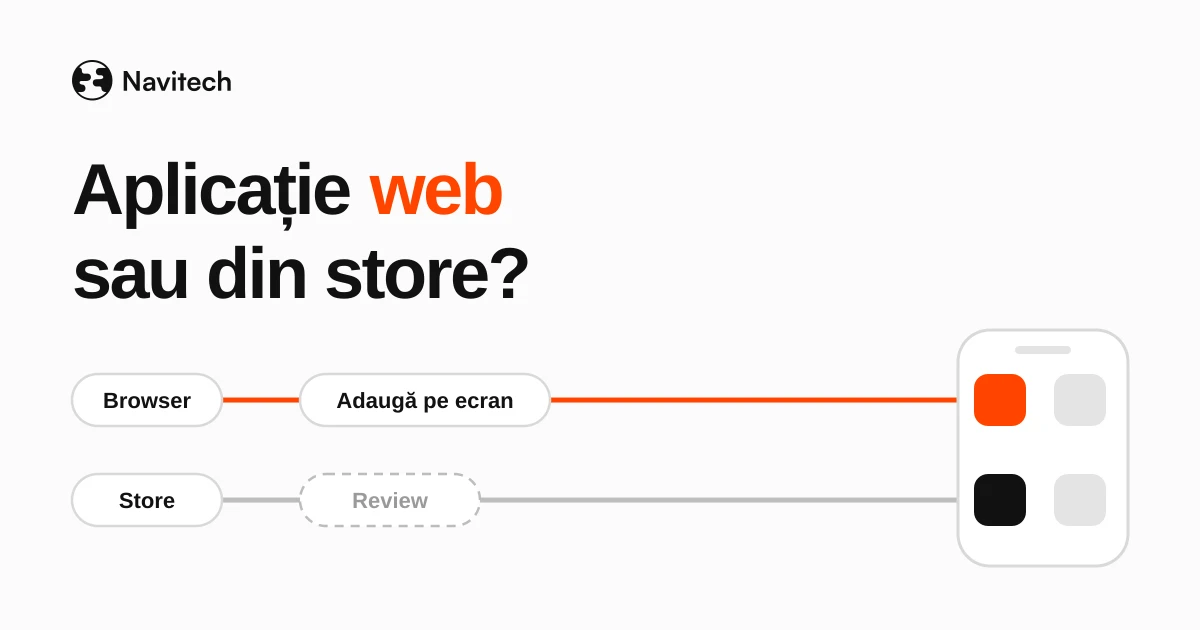
Web app or mobile app? If your users are existing customers or employees, and the app is about bookings, orders, an account portal or an internal tool, an installable web app is usually enough and cheaper to maintain. An app in the App Store or Google Play is worth it when you need phone features the web doesn't have, in-app payments, or discovery through store search.
The math changed with iOS 26. Since that version, any website a user adds to the Home Screen opens as a web app by default, with or without special configuration (WebKit).
What is an installable web app (PWA)?
A progressive web app, or PWA, is a website built to behave like an app: it has an icon on the Home Screen, opens without the browser bar, can receive notifications and can partly work offline (MDN, Progressive web apps).
It doesn't go through the App Store or Google Play. The user opens it in the browser and adds it to the Home Screen.
A PWA isn't "the budget app". It's a different tool, with different limits. For some projects it's the better choice, for others it doesn't work at all.
What changed in iOS 26?
Before iOS 26, a website on an iPhone only opened as an app if it was specifically configured for it, through a manifest file or a tag in the code. Otherwise, the Home Screen icon opened the site in the browser.
With iOS 26 and iPadOS 26, the rule flipped: by default, every website added to the Home Screen opens as a web app. Users can turn off "Open as Web App" if they just want a bookmark that opens the browser (WebKit). WebKit says explicitly that a web app experience no longer requires a manifest file (WebKit, Safari 26.0).
For a small business, this means the "installation" barrier has dropped. Your customer can have an icon on their phone that opens your app without you going through a store.
Can a web app send push notifications on iPhone?
Yes, but with a condition you need to understand before you promise anything to your users: on iOS, notifications only work if the web app has been added to the Home Screen. The feature has existed since iOS and iPadOS 16.4, and permission can only be requested in response to a direct user action, such as tapping a button (WebKit, Web Push for Web Apps on iOS and iPadOS).
WebKit also notes that you don't need an Apple Developer Program membership for web notifications.
In practice, if notifications are essential and your users won't add the app to their Home Screen, a store app is the safe option.
What can't a web app do on iPhone?
Work with certain parts of the phone. Two examples from the MDN compatibility tables:
- Bluetooth: Web Bluetooth works in Chrome on Android, but not in Safari on iOS (MDN, Web Bluetooth API).
- NFC: Web NFC works in Chrome on Android, but not in Safari on iOS (MDN, Web NFC API).
If your app has to connect to a scale, a card reader or a medical device over Bluetooth, the web isn't an option on iPhone. You need a store app, cross-platform or native, as we explained in Flutter, React Native or native.
How do the three options compare?
| Criterion | Installable web app | Store app, cross-platform | Native app |
|---|---|---|---|
| Installation | from the browser, to the Home Screen | from the App Store and Google Play | from the App Store and Google Play |
| Updates | instant, on next open | through store review | through store review, separately on each platform |
| Notifications on iOS | only if it's on the Home Screen | yes | yes |
| Bluetooth and NFC on iOS | no | yes, through native code | yes |
| Fixed store costs | none | Apple account at $99 a year, plus Google's one-time $25 fee | same |
| Best fit | existing customers, employees, bookings, orders, portals | apps for a broad audience, in-app payments, system features | heavy hardware requirements or deep integrations |
Store costs and rules, including the mandatory closed testing on Google Play for new personal accounts, are covered in our article on MVPs.
When is a store app still worth it?
Four situations where the web isn't enough:
- System features the web doesn't have: Bluetooth, NFC, some operating system integrations.
- Discovery: people look for you in the App Store or Google Play, not on Google.
- In-app payments for subscriptions or digital content, through Apple's and Google's systems.
- Trust: for some customers, "it's in the App Store" carries more weight than a link.
If your users are employees or customers you already have, a store listing rarely adds anything. You send them a link and show them how to add it to their Home Screen. And if your internal tool is turning into a full business system, our article on custom vs off-the-shelf ERP covers that decision.
Can you just put your website in the App Store?
It's not a good idea. Apple requires an app to include features, content and UI that elevate it beyond a repackaged website, or it may be rejected (App Review Guidelines, 4.2). If all you want is an icon on the phone, since iOS 26 you already get that with a web app.
Sometimes what you call an "app" is really a website with a few extra features. In that case, read WordPress vs custom website.
What does Navitech do?
Navitech's web/mobile app package starts at €5,000 excl. VAT, with an MVP delivered in 2 months. We choose the technology per project: business apps we build cross-platform, and we go native only when the requirements call for it. We write the project brief together with you, and it's included in the quote. You can see how to prepare it in our project brief template.
We also build installable web apps, not just store apps. The choice depends on who uses the app and what it has to do.
You can see the projects we've delivered on our work page.
Frequently asked questions
What is a PWA?
A progressive web app: a website that behaves like an app, with an icon on the Home Screen, notifications and, in part, offline use (MDN).
Is a web app cheaper than a store app?
Usually, yes, to maintain. You don't pay for store accounts, and updates don't go through review. The build cost, though, depends on what the app has to do, not on where it's installed from.
Do push notifications work on iPhone from a web app?
Yes, since iOS 16.4, but only if the app has been added to the Home Screen and the user accepted notifications after a direct action (WebKit).
Can I start with a web app and move to the stores later?
Yes. You can start with the web to validate the core flow, and build the store app only if you need its features. It's the same logic as an MVP.
What about Android users?
On Android, features like Web Bluetooth and Web NFC are available in Chrome (MDN, Web Bluetooth API, MDN, Web NFC API). The biggest limits are on iPhone.
Not sure which option fits you?
Tell us who uses the app, what it has to do and whether you need anything from the phone beyond the screen. We'll reply with a clear quote.
Sources
- WebKit, News from WWDC25: WebKit in Safari 26 beta: https://webkit.org/blog/16993/news-from-wwdc25-web-technology-coming-this-fall-in-safari-26-beta/
- WebKit, WebKit Features in Safari 26.0: https://webkit.org/blog/17333/webkit-features-in-safari-26-0/
- WebKit, Web Push for Web Apps on iOS and iPadOS: https://webkit.org/blog/13878/web-push-for-web-apps-on-ios-and-ipados/
- MDN, Progressive web apps: https://developer.mozilla.org/en-US/docs/Web/Progressive_web_apps
- MDN, Web Bluetooth API (compatibility): https://developer.mozilla.org/en-US/docs/Web/API/Web_Bluetooth_API
- MDN, Web NFC API (compatibility): https://developer.mozilla.org/en-US/docs/Web/API/Web_NFC_API
- Apple, App Review Guidelines, 4.2: https://developer.apple.com/app-store/review/guidelines/
- Navitech, packages, prices and projects: https://navitech.systems/en, https://navitech.systems/en/work
Daniel-Ionuț Grigoraș · Co-founder & CTO, Navitech